Software company
product
Best MetaTrader (MT4/MT5) Plugins for Forex Brokers in 2026
 Brokeree Solutions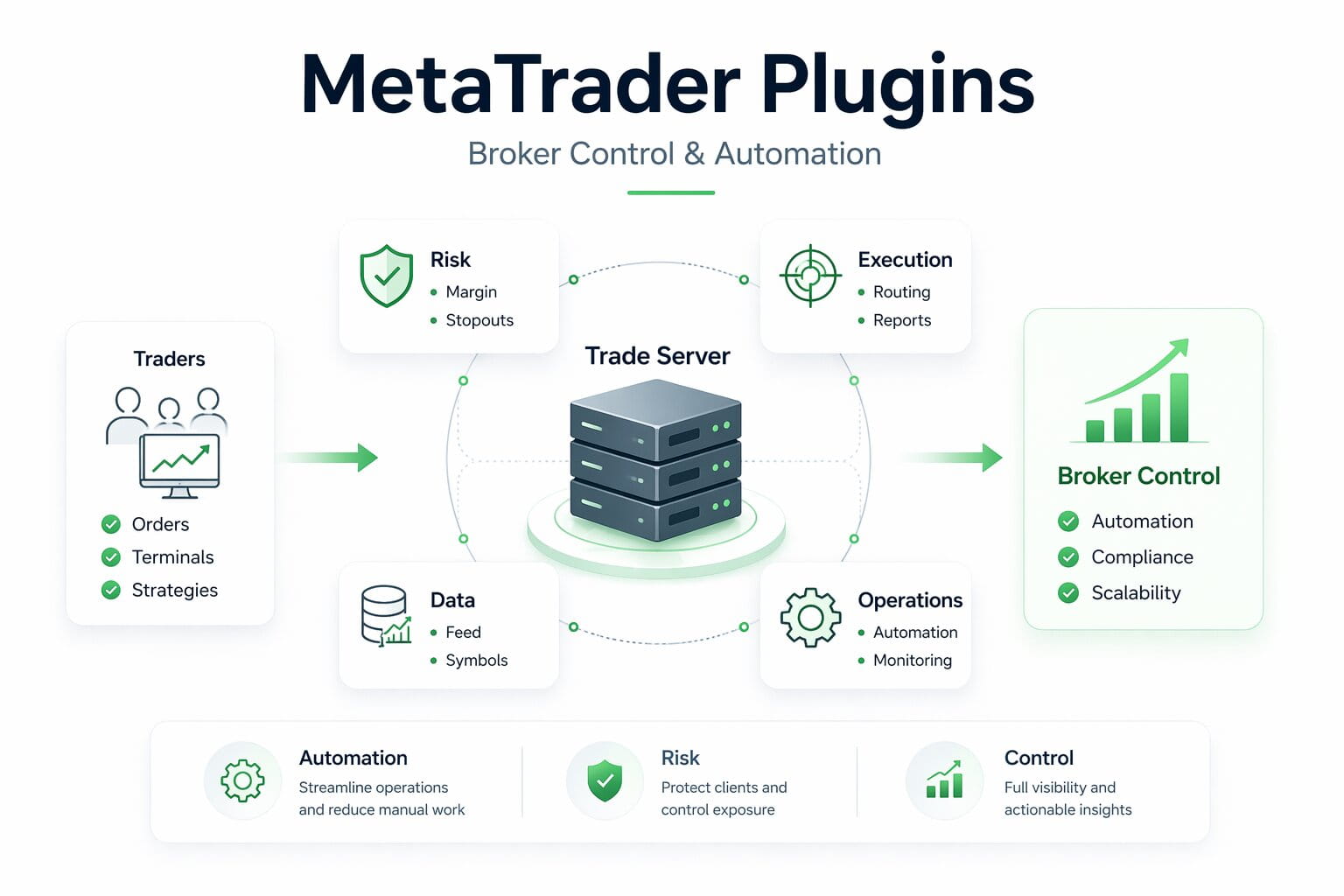
# Best MetaTrader (MT4/MT5) Plugins for Forex Brokers in 2026
Basics

MetaTrader plugins are server-side tools that extend the functionality of MT4 and MT5. They help manage how margin is calculated, credits are managed, risk is monitored, and execution behaves across every account on your server.
Without them, many advanced brokerage operations would need to be handled manually, increasing the risk of errors, operational overhead, and exposure.
MT4 and MT5 plugins cover nearly every layer of your brokerage operations. If you’re still wondering which plugins are worth your attention, this guide is for you. We’ve compiled 15 of the most important MetaTrader plugins for forex brokers: what each one does, which problem it solves, and how to decide which ones belong in your stack.
## **Key Trends and Technologies Shaping MetaTrader Plugin Demand in 2026**
Before getting into the list, it helps to understand why MT4 and MT5 plugin adoption has accelerated for forex brokers. Three key factors are driving this trend.
- #### **Traders want more than forex:**
The standard forex offering no longer cuts it on its own. Cryptocurrency CFDs now **[account](https://www.econmarketresearch.com/industry-report/cfd-broker-market)** for around 12% of total CFD trading volume, up from 5% in 2020. At the same time, demand for metals, indices, and futures continues to grow.
Brokers expanding their instrument range need plugins like MT5 Synthetic Symbols to create new tradable assets from existing price feeds, without the cost and complexity of sourcing entirely new data connections.
- #### **Automation and algorithmic trading are now standard:**
Algorithmic trading adoption has increased, with **[35% of retail traders](https://www.econmarketresearch.com/industry-report/cfd-broker-market)** now using automated strategies or Expert Advisors. That puts real pressure on broker infrastructure.
High-frequency activity at scale creates execution risks that manual oversight can’t catch fast enough. The right plugins automate risk detection, execution control, and margin management, allowing brokers to stay in control without requiring a dealer to monitor every account.
- #### **Regulation is tightening across major jurisdictions:**
The EU’s Benchmarks Regulation, FCA safeguarding rules, and ESMA’s leverage caps have raised the compliance bar for retail brokers. Meeting these requirements on MT4 typically means relying on plugins.
Tools like Dynamic Margin & Leverage, Negative Balance Protection, and Execution Report are how brokers close that gap and document that they’re meeting client protection standards.
**ALSO READ:** **[MT4 vs. MT5: Key Differences for Modern Brokers (2026 Edition)](https://brokeree.com/articles/mt4-vs-mt5-key-differences-for-brokers/)**
## **15 MetaTrader Plugins for MT4 and MT5 Brokers**
### **1\. MT4/MT5 Dynamic Margin & Leverage**
[**Dynamic Margin & Leverage**](https://brokeree.com/solutions/#mt4-mt5-dynamic-margin-and-leverage) lets brokers configure leverage and margin requirements based on a per-account and per-symbol basis, and apply those changes across servers from a user-friendly interface. Brokeree recently launched its **[Plugin Configurator](https://brokeree.com/solutions/plugin-configurator/)**, a centralized web dashboard that currently supports this plugin, with more to follow.
### **2\. MT4/MT5 Margin-Credit Tracker**
[**Margin-Credit Tracker**](https://brokeree.com/solutions/#margin-credit-tracker) withdraws credit on a margin call or a stopout to prevent clients from going below a zero balance. Brokers can configure the trigger using two methods: an equity-to-credit ratio or a margin level calculated without the credit. Either way, the credit is removed before the account spirals deeper into a loss position.
This works alongside Negative Balance Protection (explained below) as a layered approach to protecting both the client and the broker from runaway drawdowns on credited accounts.
### **3\. MT4 Negative Balance Protection**
When a client’s deposited balance drops to zero and they’re still trading on credit, there’s a real risk the account will end up in negative territory, meaning the client owes the broker money. Negative Balance Protection prevents this by automatically topping up the account balance when it drops below zero, stopping losses at the point of depletion.
This is relevant for brokers running bonus or credit programs. It also addresses a growing regulatory expectation: several financial regulators, including those under ESMA, now require brokers to prevent retail client accounts from going negative. Brokeree’s **[Negative Balance Protection](https://brokeree.com/solutions/#negative-balance-protection)** plugin handles this automatically, removing the need for manual intervention or after-the-fact reconciliation.
### **4\. MT4 Symbol Schedule**
MT4’s native platform gives brokers limited control over trading session configuration. **[MT4 Symbol Schedule](https://brokeree.com/solutions/#symbol-schedule)** extends this by allowing brokers to configure trading sessions with 1-second precision per symbol, giving them full control over the process.
The plugin can also block ticks and pending order activations for specified symbols according to a defined schedule, without affecting other instruments on the server.
### **5\. MT5 Synthetic Symbols**
**[MT5 Synthetic Symbols](https://brokeree.com/solutions/#synthetic-symbols)** allows brokers to expand their list of tradable instruments by creating new ones from existing price feeds. For example, instead of listing gold as a single 100-troy-ounce contract, a broker can offer it in grams or kilograms. A low-priced crypto like TRX can be displayed as TRX1000 at a more readable price. Multiple assets can also be combined into a custom index with weighted coefficients.
The plugin also includes built-in hedging: when a synthetic instrument is traded, it automatically converts the volume back to the original size and routes it to a coverage account.
### **6\. MT4/MT5 Execution Report**
[**Execution Report**](https://brokeree.com/solutions/#execution-reports) generates detailed reports on aggregated spreads received from liquidity providers across a specified period. Brokers can filter by account, symbol, or time range, and export the data to Excel for further analysis. When multiple MetaTrader servers are connected, the plugin provides a consolidated snapshot of spread data across all of them.
As regulatory requirements tighten around trade reporting and execution-quality disclosure, Execution Report provides brokers with the documentation they need.Brokers rely on tools like this to disclose trading costs and meet reporting obligations, particularly on MT4, where native compliance tooling is more limited than on MT5.
### **7\. MT4/MT5 Trade Copier**
**[Trade Copier](https://brokeree.com/solutions/#trade-copier)** replicates positions from one master account to one or many follower accounts. Brokers use it to manage proprietary trading accounts, create internal hedging setups, or mirror trades across groups for risk analysis.
Key functions include volume scaling with multipliers, direction reversal for accurate book representation, and group-level filtering, making it one of the most versatile plugin tools available.
### **8\. MT4/MT5 Symbol Editor**
[**Symbol Editor**](https://brokeree.com/solutions/#symbol-editor) allows brokers to update symbol settings, including swaps, in bulk, automatically, based on data from liquidity providers. Instead of logging into each server and editing instruments one at a time, your team makes one update, and it propagates across the board.
For brokers running dozens or hundreds of symbols across multiple servers, this saves hours of manual work per week and reduces configuration errors that affect client pricing.
This brief was generated from the original reporting. Read the full article at the source:
Read at brokeree.com