Broker
product
Trading Platforms


[Open Account](https://client.onsafx.com/register)

[Login](https://client.onsafx.com/login)
# MetaTrader 5 Trading Platform
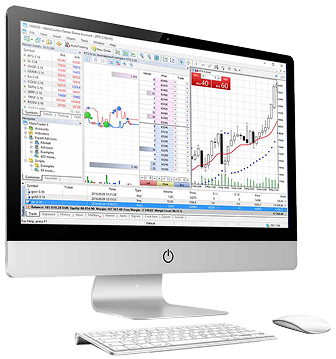
MetaTrader 5 is a modern and intuitive trading platform offering advanced tools and fast execution. It is compatible with Windows, Android, macOS, iOS, and web browsers for flexible access across all devices
[Start Trading](https://client.onsafx.com/register)

Trading-windows[onsaadmin](https://onsafx.com/author/onsaadmin/)2026-03-28T11:05:39+00:00
[Windows](https://onsafx.com/trading-windows/)
[Android](https://onsafx.com/trading-android/)
[macOS](https://onsafx.com/trading-macos/)
[iOS](https://onsafx.com/ios/)
[WebTrader](https://onsafx.com/web-trader/)
Experience Forex Trading on the
Leading MT5 Platform
Recognized as the industry’s leading platform, MetaTrader 5 (MT5) stands out as the most trusted and widely used trading platform available. Its intuitive design and user-friendly interface offer traders the essential tools and features needed for effective online trading. Explore the world of forex trading with OnsaFX’s reliable MT5 platform
What is Metatrader 5 for Windows?
MT5 is one of the most reliable and popular platforms available and provides essential tools and resources needed for successful online trading performance. Register and trade over 500 financial instruments in Forex CFDs, spot metals, futures, shares, spot indices, and commodities with quick execution. Experience trading with spreads as low as 0 pips, advanced trading signals, and functions in our user-friendly platform created specifically for online trading. Trade Forex CFDs and spot markets from your desktop with MetaTrader 5.
[Download MT5](https://download.mql5.com/cdn/web/onsafx.pty.ltd/mt5/onsafx5setup.exe)

MT5 Windows Trading Features
- Manage orders, positions, and equity online
- All order types and execution modes
- Monitoring of financial instruments’ prices and forex rates
- Advanced charting and indicators
- Online streaming news
- Explanatory Activity Reports
MT5 Windows – Quick Login
- Download and install the MT5 platform application
- Select between logging in with an existing account or opening a new account
- Go through the list of brokers and choose OnsaFX as your broker
- Enter your real or demo account login data (username and password provided in your OnsaFX welcome email). Start trading!
MT5 Windows User Guide
Having trouble downloading the platform? Refer to our detailed user guide on how to download, install and use the MT5 platform for Windows
MT5 for Windows – FAQ
Visit our FAQ page and go through the list of various answers to your possible queries.
Find more information on the MT5 trading platform for Windows

Why trade forex with the OnsaFX Metatrader 5?
OnsaFX is a pioneer in MT5 trading. Besides its easy usability and installation on Windows, it allows you to implement strategies of various complexities. With it, you can benefit from features that other platforms do not provide, follow price variations, and speculate on the charts while following the trends to locate your pre-determined trades.
With the OnsaFX Metatrader 5 platform, you can take advantage of leverage up to 1:1000, various account types to choose from, as well as flexible trading conditions, mobile trading, in-depth analysis, and support.
[Start Trading](https://client.onsafx.com/register)
Why trade forex with the OnsaFX Metatrader 5?
OnsaFX is a pioneer in MT5 trading. Besides its easy usability and installation on Windows, it allows you to implement strategies of various complexities. With it, you can benefit from features that other platforms do not provide, follow price variations, and speculate on the charts while following the trends to locate your pre-determined trades.
With the OnsaFX Metatrader 5 platform, you can take advantage of leverage up to 1:500, various account types to choose from, as well as flexible trading conditions, mobile trading, in-depth analysis, and support.
[Download MT5 Advanced](https://download.mql5.com/cdn/web/onsafx.pty.ltd/mt5/onsafx5setup.exe)
MT5 Advanced
Trading Features
Manage orders, positions, and equity online
Monitoring of financial instruments’ prices and forex rates
Advanced charting and indicators
Online streaming news
Activity reports
Permitted automated strategies
Built-in ability to use EAs (Expert Advisors)
MT5 Windows Advanced
Quick Login
Download the standard client terminal by clicking on the “Download” button
Install the advanced features by clicking on the “Retrofit” button
Select between logging in with an existing account or opening a new account
Select OnsaFX as your broker from the list
Enter your real or demo account login data (username and password provided in your OnsaFX welcome mail)
Start trading!

MT5 Advanced User Guide
Read the user guide on how to download, install and use the MT5 platform for Windows
[Download MT5 Advanced User Guide](https://www.metatrader5.com/en/terminal/help/startworking/start_advanced)
What is MT5 MultiTerminal
for Windows?
With OnsaFX MultiTerminal, you can manage multiple accounts from one single terminal. Place your orders with one click. Multiple account management made easy with the OnsaFX MultiTerminal.
[Download MT5 Multiterminal](https://download.mql5.com/cdn/web/onsafx.pty.ltd/mt5/onsafx5setup.exe)

MT5 MultiTerminal Trading Features
- Multiple order types
- Multiple account management and execution
- Live monitoring for prices of financial instruments.
- Advanced Charting
- Activity Reports
MT5 Windows Advanced
Quick Login
- Download the terminal.
- Run the .exe file after it has downloaded.
- When launching the program for the first time, you need to fill in your login details.
- Enter your real or demo account login. data (username and password received in your OnsaFX welcome mail).

MT5 Multiterminal User Guide
Read the user guide on how to download, install and use the MT5 multiterminal for Windows
[Download MT5 Multiterminal User Guide](https://www.metatrader5.com/en/terminal/help/startworking/start_advanced)
OFFICAL PARTNER OF GETAFE CF
**[Company](https://onsafx.com/about-us/)**
[About Onsa](https://onsafx.com/about-us/)
[License & Regulation](https://onsafx.com/license-regulation/)
[Support Transparency](https://onsafx.com/support-transparency/)
[Awards](https://onsafx.com/awards-recognition/)
[Sponsorship](https://onsafx.com/onsa-sponsorship/)
[OnShine Africa](https://onsafx.com/onshine-africa/)
**Trading**
[Trading Platforms](https://onsafx.com/trading-windows/)
[Account Types](https://onsafx.com/account-types/)
[Trade101](https://onsafx.com/trade101/)
**Learning Centre**
[All Courses](https://onsafx.com/learning-centre/)
[Advanced Courses](https://onsafx.com/learning-centre-advanced/)
[Beginner Courses](https://onsafx.com/learning-centre-beginner/)
[Intermediate Courses](https://onsafx.com/learning-centre-intermediate/)
[Insight](https://onsafx.com/learning-centre/insights/)
**Markets**
[Forex](https://onsafx.com/marketing-forex/)
[Commodities](https://onsafx.com/marketing-commodity-trading/)
[Indices](https://onsafx.com/marketing-indicestrading/)
[New ETF CFDs](https://onsafx.com/etf-trading/)
[CFD Trading](https://onsafx.com/cfd-trading/)
[Trade Share CFDs](https://onsafx.com/trade-share/)
**Community**
[Partners](https://onsafx.com/community/)
[Help Center](https://onsafx.com/help-center-affiliates/)
[+27010 158 4439](tel:+2701015
This brief was generated from the original reporting. Read the full article at the source:
Read at onsafx.com
ONSAFX